
Google Play Books & Audiobooks
Google LLCBooks & Reference
4.782.20K Reviews
- Version
- Varies With Device
- Installs
- 1.00B
- Age Rating
- Teen
Screenshots
Our Review of Google Play Books & Audiobooks
 Analysis by Appyee
I judge a reading app by more than how many books it can put in front of me. I want to know whether I can make text comfortable, find my place again when life interrupts, and use it in the settings where I actually read or listen. Google Play Books & Audiobooks is Google LLC’s free Books & Reference app, and its mix of ebooks and audiobooks makes it a practical option for readers who move between formats. It has a 4.7 average from around 3.1 million ratings and over a billion installs, but the useful question is whether its everyday experience fits your needs.
Reading that adapts to the moment
For ebooks, adjustable font size and background color give me a straightforward way to make a page more comfortable. Night mode is handy when I’m reading in dim surroundings, while changing the text size can make a long session feel less tiring. These options are useful, but they are not a substitute for every accessibility setting someone might need. I’d treat them as practical controls rather than assume they solve all reading or vision-related barriers.
One small habit makes the customization more useful: I set the page for the place I’m reading, not just for the book. A brighter background may work well during the day, while a darker one can be easier on my eyes in the evening. If you share a device or switch between locations, it is worth checking your display choices when a page suddenly feels uncomfortable instead of assuming the book itself is the problem.
Navigation, notes, and getting back on track
The app’s search and browsing help narrow down a large catalogue by genre or author, and editor’s picks offer another way to discover something when I don’t have a title in mind. I find that most useful when I’m browsing for pleasure rather than trying to follow a strict reading list. A preview can also help me judge whether a book’s opening and writing style suit me before I commit to buying it.
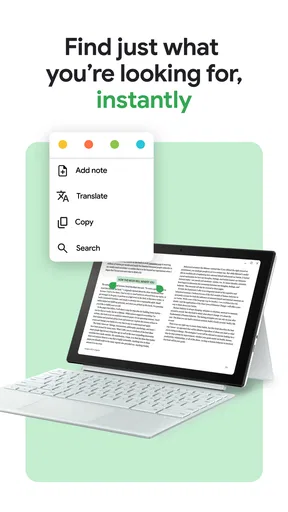
Highlights and notes make the app more useful for study or reference reading. My practical tip is to mark only passages I expect to revisit and add a short note explaining why they matter; a screen full of highlights is harder to use later. The ability to export notes can help when I want to work with them outside a reading session, although anyone relying on a particular study or citation workflow should check that the exported material fits their needs.
Different ways to read and listen
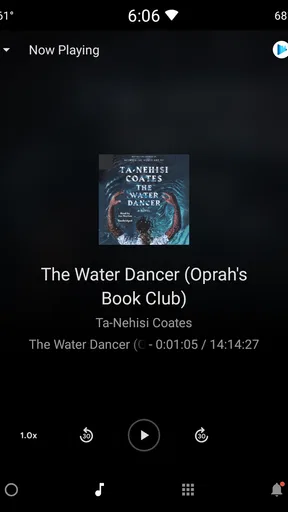
Audiobooks offer a different kind of access: I can listen while doing a task that leaves my eyes and hands busy. Playback speed is adjustable, and the app remembers where I stopped, which lowers the effort of returning after an interruption. I would still test a comfortable speed rather than automatically raising it; a faster setting may save time, but it can make names, complex arguments, or unfamiliar accents harder to follow.
For a commute, I might read an ebook while seated and switch to an audiobook when walking or handling errands. Syncing across devices is useful in that sort of routine because I can move between a phone and a tablet without having to manage my place manually. It is best suited to someone who values that flexibility; readers who want one device-free, paper-based routine may get more from a printed book.
Where it fits—and where it may not
Compared with a dedicated ebook reader, this app puts reading and listening together on a device you may already carry, and it connects to Google account purchasing. That convenience is a real strength. A dedicated reader may be a better choice for someone who wants a separate reading device or whose priorities are centered on its particular screen and controls. Compared with a library app, Play Books is oriented around its own browsing and purchase experience, so readers who mainly borrow through a local library should keep using the service that supports their borrowing routine.
The app is free to install, while books and audiobooks may cost money; some in-app purchases range from a cent to eight thousand dollars per item, so it is sensible to check the item and purchase details before confirming. Free books are available, though the selection can feel limited if you expect every title to cost nothing. The content rating is Teen, a useful point for families considering who will use the app, but it does not replace checking an individual book’s suitability.
For someone deciding whether to try it, the simplest test is to pick a sample, adjust the text for a comfortable reading session, and see whether browsing feels natural. Then try an audiobook at a speed that remains easy to understand and check whether switching devices suits your habits. Google Play Books is a good fit for readers who want ebooks and audiobooks in one place, flexible display controls, and notes for occasional study. It is less compelling if your main need is borrowing through a library, a specialized accessibility setup, or a dedicated reading device with controls tailored to that preference.
Browsing the Library
First things first, the library. With Google Play Books & Audiobooks, you’re stepping into a veritable treasure trove of books. Imagine a sprawling bookstore right in your pocket. From timeless classics to the latest bestsellers, the selection is vast. And if you’re into audiobooks, you’re in luck, because there's no shortage of those either. Whether you’re commuting or just chilling at home, you’ve got plenty to choose from.
One thing I love is the smooth browsing experience. The app is super user-friendly, and finding your next read is as easy as pie. You can search by genre, author, or even check out the editor’s picks if you’re feeling adventurous. It’s like having a personal librarian who’s always on the clock.
Reading Experience
Diving into the reading experience, the app doesn’t disappoint. For those who enjoy eBooks, the customizable reading settings are a treat. You can adjust the font size, change the background color, and even switch to night mode for those late-night reading marathons. It’s all about making the experience as comfortable as your favorite reading nook.
Now, for the audiobook lovers, the playback features are top-notch. You can adjust the playback speed, which is a lifesaver if you’re trying to speed through a book or slow it down to savor every word. Plus, the app remembers where you left off, so you can pick up right where you stopped, hassle-free.
Additional Features
What’s a good app without some nifty features, right? Well, Google Play Books & Audiobooks packs a punch with its additional offerings. There’s an option to sync across devices, which means you can start on your tablet and continue on your phone without missing a beat. Perfect for someone like me who’s always on the go!
And if you’re a note-taker or a highlight fanatic, the app has you covered. You can highlight text, make notes, and even export them for later. It’s a dream for students or anyone who likes to keep track of their thoughts while reading.
Purchasing and Pricing
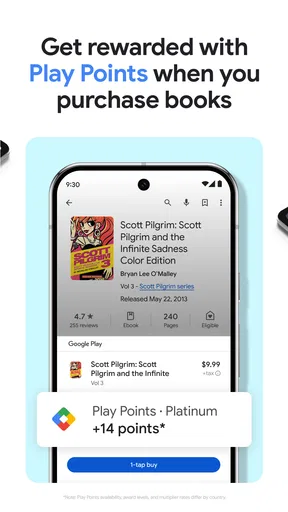
Now, let’s talk about the not-so-fun part: purchasing. The app connects seamlessly with your Google account, making buying books a breeze. Prices are competitive, and there are often deals and discounts to take advantage of. Plus, you can preview samples before making a purchase, which is great for those of us who like to test the waters first.
One thing to note, though, is that while there are free books available, the selection is somewhat limited. But hey, good things often come at a price, right?
Final Thoughts
All in all, Google Play Books & Audiobooks is a fantastic companion for anyone who loves to read or listen to books. Its extensive library, user-friendly interface, and customizable features make it a standout choice. Whether you’re curled up on the couch or on a packed train, this app makes sure you’re never without a good book.
So, if you haven’t tried it yet, I’d say it’s about time to give it a shot. Who knows, you might just find your next favorite read or listen. Happy reading, everyone!
Privacy and Permissions
See what permissions an app requests and how it handles your data.
- Identity
- find accounts on the device, add or remove accounts
- Contacts
- find accounts on the device
- Photos/Media/Files
- read the contents of your USB storage, modify or delete the contents of your USB storage
- Storage
- read the contents of your USB storage, modify or delete the contents of your USB storage
- Microphone
- record audio
- Other
- view network connections, allow Wi-Fi Multicast reception, measure app storage space, full network access, read sync settings, run at startup, use accounts on the device, prevent device from sleeping, toggle sync on and off, read Google service configuration
How Google Play Books & Audiobooks Compares
Full ComparisonChoose Google Play Books for books and audiobooks without a subscription, Kindle for a broad ebook library and reading tools, or Audible for a dedicated audiobook and podcast service.
| App | Developer | Rating | Price |
|---|---|---|---|
 Google Play Books & AudiobooksThis App | Google LLC | 4.7 | Free |
 Amazon Kindle: Reading App | Amazon Mobile LLC | 4.8 | Free |
 Audible: Audiobooks & Podcasts | Audible, Inc. | 4.6 | Free |
Verdict
Strengths of Google Play Books & Audiobooks
- Extensive library of books and audiobooks.
- Syncs across devices seamlessly.
- Offline reading and listening options.
- Customizable reading settings.
- Regular updates with new features.
Limitations of Google Play Books & Audiobooks
- Limited free content options.
- Some books are region-restricted.
- Audiobook playback lacks advanced features.
- Occasional app crashes reported.
- No subscription model for unlimited access.
Other Releases by Google LLC
View All
Google Calendar
Productivity4.6

Google Messages
Communication4.6

Tools4.0

Google TV
Video Players & Editors3.9
Similar Picks in This Category
View All
네이버 - NAVER
NAVER Corp.3.5

Wattpad - Read & Write Stories
Wattpad.com3.7

King James Bible - Verse+Audio
Ozion4.8

Bible Offline-KJV Holy Bible
Bíblia Offline4.9

Amazon Kindle: Reading App
Amazon Mobile LLC4.8

Audible: Audiobooks & Podcasts
Audible, Inc.4.6
You May Also Like
View All


Frequently Asked Questions
What devices are compatible with Google Play Books & Audiobooks?
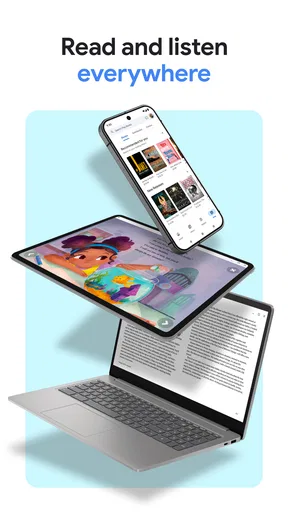
Google Play Books & Audiobooks is compatible with a wide range of devices, including Android smartphones and tablets, iPhones, iPads, and web browsers. You can also access your library on e-readers and smart displays that support Google Assistant. This versatility ensures you can enjoy your content anywhere and anytime.
Can I read or listen to books offline?
Yes, Google Play Books & Audiobooks allows you to download your purchased or rented books and audiobooks for offline access. This feature is particularly useful for users who travel frequently or have limited internet connectivity, ensuring that you always have your favorite reads and listens at your fingertips.
Are there any subscription plans available?
Google Play Books & Audiobooks does not currently offer a subscription plan like some other services. Instead, it operates on a pay-per-book basis, allowing you to purchase or rent individual titles. This model provides flexibility to choose only the content you want without a recurring monthly fee.
Does Google Play Books support family sharing?
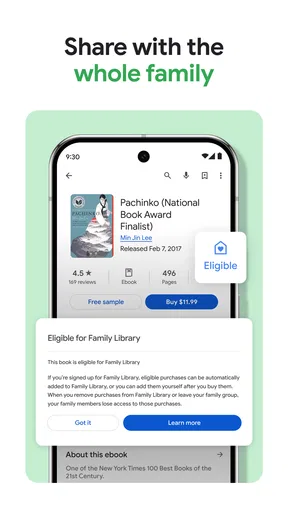
Yes, Google Play Books supports family sharing through the Google Play Family Library. This feature allows you to share eligible books with up to five family members. It’s a great way to share your favorite reads without needing to purchase multiple copies, though not all titles may be eligible for sharing.
How do I get started with Google Play Books & Audiobooks?
To get started, download the Google Play Books app from the Google Play Store or Apple App Store. Once installed, you can browse the vast library of books and audiobooks, make purchases, and start reading or listening. The app offers a user-friendly interface with personalized recommendations to enhance your experience.
